I WANT TO PLAY!!!!

mcardall

New member
I WANT TO PLAY!!!! *eta: found a work-around

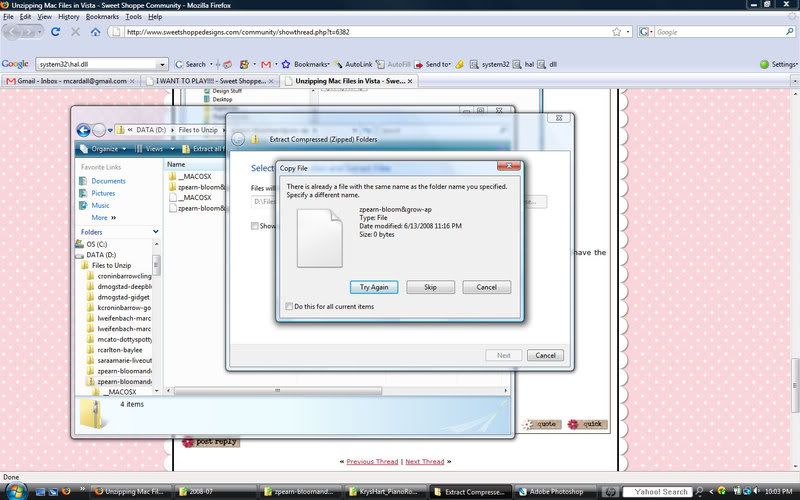
And I can't get my new Zoe Pearn goodies to unzip! I keep getting an error that there is already a file with this name. So I try to rename it and it still doesn't work. I looked around here and didn't see any special instructions. Is it because her stuff is created on a mac? I remember reading something about doing something special with mac products, but I can't find it again!

Anyone have any advice? I am running Vista and using Vista's built-in zip utility. I have never had any other issues with it.


*eta: Found a work-around*
 
Last edited:
I've had the same problems with mac zipped files on Vista. The instructions here didn't help me though. My computer guru dh told me to visit download.com and download WinZip. Since I've done that I've been able to unzip everything without any issues! HTHs :)
 
okay, that's the post I remember, but that's not my problem...

ZipIssues.jpg


Anyone know before I go bother Robin?
 
I think the issue might be that there are PC files and Mac files in the same zip. I always click skip at this screen.
 
That's so weird! I bought that kit and unzipped in Vista with no problems... hope you figure it out! Maybe try Winzip as suggested above...
 
Meredith, that is the same exact problem I was having! I'm sure there is a fix, but I don't know it. WinZip is free - I didn't register it and it still works...so you might want to try it. At least then you can enjoy your Zoe goodies! :)
 
I will go download WinZip. As a work-around, I just went into the zip files and copied the files I wanted (all of the non-Mac files!) and moved them into a new folder that I named with the kit name.

I even tried downloading again to be sure that it wasn't a corrupt file. The files that are giving me issues are just called File. There isn't a file type. But it is in every single one of the files I downloaded. I am guessing it is a mac file of some kind. Oh well! At least I figured out how to get my goodies!

Thanks for your help, everyone!
 
did you get it to work mere?!

hey you hit skip *not try again* and then on the next one you hit click the little box and put an x in it and then YES...i think that should help :) try it and let me know... :) xoxo

LOL krystal..and then think to yourself..what would ashli do...oh my gosh..then she would kick it throw it cuss it and BURN IT! :) glad that i am so level-headed... :)
 
Krystal, if I cuss backwards is it still a bad word? :) Although, "what the lleh?" does look kinda fun!

ash, you forgot "spray some glitta on it!"

I really did try every option. It's probably just me because I'm lucky like that. And downloading WinZip is on my to-do list (with a bazillion other things) for tomorrow!
 
I have Vista, and I never had that problem with files, but I suppose it's because I use ACDSee to unzip maybe?

I hope you figure it out Meredith!
 
THe same thing happens to me, and I'm on Zoe's CT! I figured out that clicking "unzip here" works while "Unzip all" does not. I know it's a little thing, but you could give that a try? I think it has something to do with zipping in a Mac and Vista.
 
Back
Top