Saving LO's in gallery?

aleerichards

New member
How do you all get your LO's to be under 150kb? I have no idea how to do it, and it takes me a few tries before I get mine small enough.

Usually I take it down to 72, and then to 600x600 pixels, and save for web and it's still over 200. What am I doing wrong??

Any help is appreciated, thanks!
 
Not sure what program you are using but usually when you choose save for web you can adjust the quality which will adjust the file size.
 
It's hard to say, I am using photoshop and I do the "save for web" thingy and take it down to the highest quality I can and still have it be just under 150kb. It seems like 600x600 at 72 dpi should be way under 150??? Are you saving as a jpeg?

-Diana
 
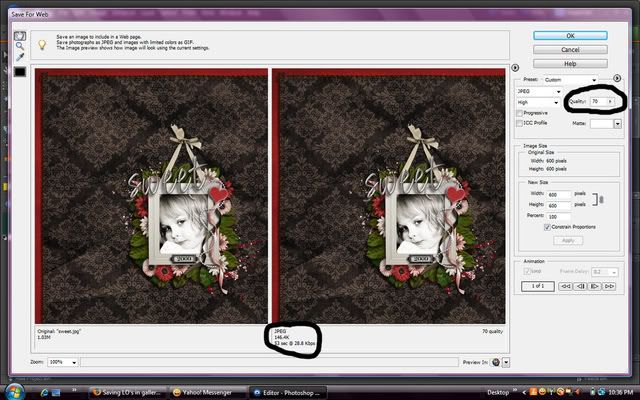
when you do save for web, there is a little slider near the top on the right. you slide that down and in the preview on the right, the kb will get smaller. just move it til its under 150. i should get you a screen shot...hold on...

screenshot.jpg


kinda hard to see but i hope it helps!
 
Last edited:
as soon as i'm done, i just go straight to save for web. you can save it as a jpeg through that.
 
When I'm done, I flatten my layout, resize to 600 x 600 (I don't bother changing the dpi) and do a save for web.
 
Okay...so just do be sure...

FIRST, I change my LO size to 600x600. Do I keep it at 300ppi? Or change to 72?

Keeping it at 300, I used the slider thingy (thank you SOOO much for that picture! Saved me completely!) and it ended up at about 62 (yours is at 70) to make it under 150.

Does that sound right?
 
yep. some people flatten their layouts before using save for web, but i don't. i go directly to that, resize it to 600x600 then adjust the slider. the number the slider is on depends on how many layers i have on my layout, since i don't flatten first. maybe i should, lol. and i keep mine at 300.
 
Thank you all so much! I haven't been able to figure this out, and I feel like a dorky doo asking how to do something that is so obvious to everyone!:) I re-uploaded my LO and I can tell a HUGE difference! Thanks!
 
yep. some people flatten their layouts before using save for web, but i don't. i go directly to that, resize it to 600x600 then adjust the slider. the number the slider is on depends on how many layers i have on my layout, since i don't flatten first. maybe i should, lol. and i keep mine at 300.

If I don't flatten, my shadows end up looking all crazy.
 
Back
Top