New here, confused and need help!

Blessed

New member
LOL...how's that for a title? This is my first post so please be gentle on me. :p Sorry in advanced if I posted this in the wrong place.

OK, so when I make a LO and then save it as a PSD file and then close it, I have a problem whenever I want to edit it later. What happens is whenever I open it and want to edit a layer (e.g. like rotating the element) it turns it white like it becomes a JPG instead of staying transparent like a PNG. I hope that makes sense. Please help...what am I doing wrong?

Thanks in advanced! :)
 
Last edited:
Wow... how frustrating! By the way, welcome to the Sweet Shoppe! :)
I've not heard of that happening before! What program are you using to scrap with? Hopefully someone has a suggestion to help. :)
 
I have no idea what could be wrong. Could be something in your program but you didnt mention which one you use so maybe someone else has dealt with this. I just wanted to add a welcome though since I couldnt be more helpful LOL

So welcome to SSD!! Hope you have loads of fun here :)
 
It is totally frustrating and I feel like pulling my hair out. All the hard work that goes into doing a LO and I can't even edit it later. I don't understand and I have never heard of anyone having this problem. GRRRRR!
 
Hi and welcome to SSD!

I use PSE7 and have never had that happen. I just have other stupid issues - like it not saving my settings all of a sudden when I didn't change anything. :blink:

Maybe try saving your files as TIF's and see if it happens. The TIF files are smaller but still have the layers you can edit. :)
 
Are you positive you are saving it as a PSD file? If you look at your file on your hard drive and you right click on it and choose "properties"...what type of file does it say it is?

If it says it is a PSD file...then start a new file, just a real quick one...then go to

SAVE AS .... choose PSD ...but before you hit ENTER...

in the SAVE OPTIONS...is the box "layers" checked...if not...it won't save it in layers.

Welcome to SSD!
 
Are you positive you are saving it as a PSD file? If you look at your file on your hard drive and you right click on it and choose "properties"...what type of file does it say it is?

If it says it is a PSD file...then start a new file, just a real quick one...then go to

SAVE AS .... choose PSD ...but before you hit ENTER...

in the SAVE OPTIONS...is the box "layers" checked...if not...it won't save it in layers.

Welcome to SSD!
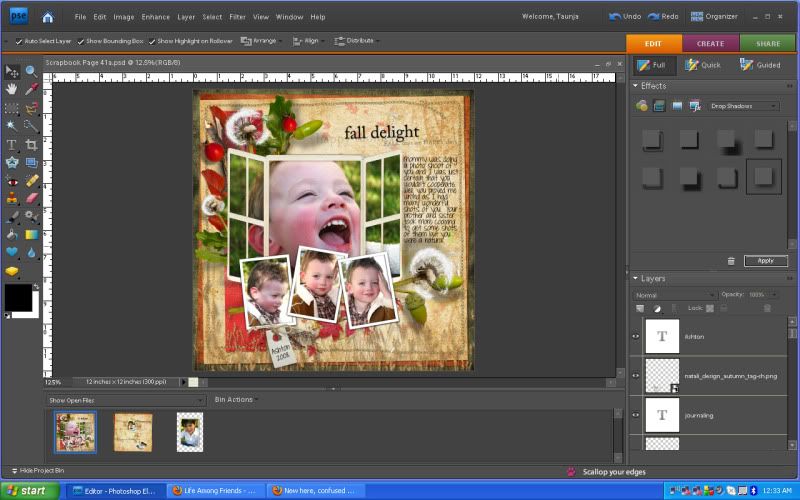
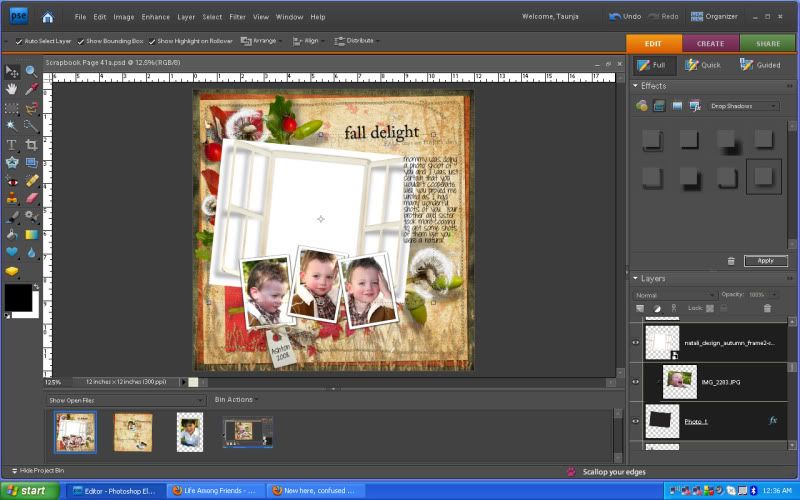
Yeah, it's a PSD and it is saved in layers. When I re-open the document it is still in layers but here is what happens. I took some screenshots to show you guys. Thanks so much for the welcome and for all your help. :)

Pic 1: Is when I open the document
Pic 2: Is when I rotate the big frame but before I click on the green checkmark
Pic 3: Is what happens after I hit the green checkmark. It loses its transparency. Weird, huh???

LO1a.jpg


LO1b.jpg


LO1c.jpg
 
Last edited:
Oh I was really hoping it was something I would know...I use CS3...my PSE I believe is a 5 ... will have to look on son's computer...but your screen shots look totally different...guess that is the diff between version 5 and 7. I'm sorry. I'm sure SOMEONE here will be able to figure it out.
 
Welcome to SSD!!

That's a gorgeous page!! (Anybody else who upgraded to CS miss the photo bin??)

Do you think it has something to do with layer styles maybe? I can't really see by just looking at your screen shots. It looks like you just clipped the photo to the shape layer, but maybe check to see that it's not somehow reverting to 0% opacity or fill or doesn't have some sort of white color overlay or other "global" layer style applied.

Really, I don't have any great suggestions at all for you. Sorry!
 
The only thing I can think of is that maybe you pulled that element straight from the photo bin and onto your LO.

If so, try it this way instead: make it where you have little windows of both your LO and your element in the work space area. Then drag the element onto the LO from there, rather than from the photo bin.

I hope that will solve it for you. It's the only thing I can think of.
 
I'm assuming it's the frame, picture and shape layers that you are trying to rotate? If yes, did you try merging them all together before rotating them?
 
That's really strange. It looks like it is doing something to that .png frame layer only. When I look at that layer in the layers pallette, what is that black stuff I'm seeing in the lower right corner? I use CS4 and I've never seen a layer with that on there?
 
Does PSE 7 use layer masks? It looks like it might be a layer mask issue. I could be totally wrong though because I've never used PSE.
 
Last edited:
The little black mark in the right corner of the layer means it's a frame layer, or something like this. I ran into this problem when I opened up PSE 6 (came with my graphics tablet) to show some gals how to use it. I was use to PSE 5, that would let you drag items up from the photo bin directly on to your LO. In PSE 6 and PSE 7, if you do that, it makes them a "frame" layer. Don't know exactly what it means. But try Kresta's suggestion and see if it fixes it. :(
 
You girls are awesome...I so appreciate all your help. Kresta and suzyqscraps...you were right. I dragged them from the project bin...I am a dork. I had no idea. Thank you for figuring this out for me. I was going nuts trying to figure this out. You all rock. Thank you all for the warm welcome. :D
 
Welcome to SSD!!

That's a gorgeous page!! (Anybody else who upgraded to CS miss the photo bin??)

Do you think it has something to do with layer styles maybe? I can't really see by just looking at your screen shots. It looks like you just clipped the photo to the shape layer, but maybe check to see that it's not somehow reverting to 0% opacity or fill or doesn't have some sort of white color overlay or other "global" layer style applied.

Really, I don't have any great suggestions at all for you. Sorry!

Yes...I miss that photo bin ever since I upgraded to CS3...however I love all the extra things I can do in CS3! ... including all those actions I couldn't run in PSE. ...love the bridge and am still learning on that...love camera raw editing features...
 
You girls are awesome...I so appreciate all your help. Kresta and suzyqscraps...you were right. I dragged them from the project bin...I am a dork. I had no idea. Thank you for figuring this out for me. I was going nuts trying to figure this out. You all rock. Thank you all for the warm welcome. :D

YAY! So glad you got it figured out! :thumbup:
 
You girls are awesome...I so appreciate all your help. Kresta and suzyqscraps...you were right. I dragged them from the project bin...I am a dork. I had no idea. Thank you for figuring this out for me. I was going nuts trying to figure this out. You all rock. Thank you all for the warm welcome. :D

No worries, sweetie! After totally using and abusing the photo bin in PSE 5, I was really going nuts trying to figure out why it wasn't the same in PSE 6. :blink: Glad you got it figured out!
 
Back
Top