How do you organize all of you scrapping supplies?

msteiner99

New member
I'm sure this has already been asked a million times. (sorry!)

I have so much stuff, but have no idea how to organize it so that I can see what I have. Right now everything is organized by store/designer/kit. That's fine, but I can't see what I have! Aside from printing out the previews of each kit and making a binder - what can I do?

(I use a Mac - if that makes a difference)
 
I have a separate folder for elements, kits, paper packs, templates and just put new stuff in the appropriate folder. It's hard to organize by store because designers move around so often.
 
I have folders for each season and holidays and birthday, then I have folders for type of product and elements like clipping masks, stitches, templates, paper that isn't part of a full kit, misc elements, flowers, frames and word art... then I have a folder for full kits that don't fit into any of those categories and inside that folder I have folders sorted by storename/designer. I also have an unused kits folder and CT folders for new stuff before they get used and then sorted into their various folders. Oh and in the templates folder I have folders to sort them by number of photos.
 
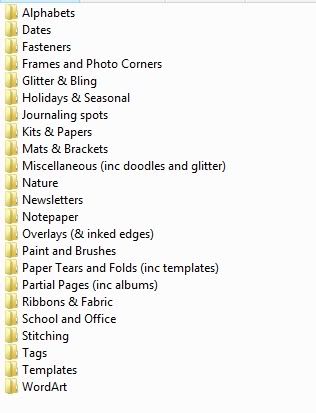
I copy items I think I'll use again into the appropriate folder (frames, stitching, etc) in addition to keeping it with its kit. That makes it easy to find a specific item to add to a LO. Here are my categories.

Categories.jpg


Within the kits and papers folder, each kit gets a folder labeled designer_kit_storeabbreviation. That way I can see previews of every kit at a glance. Here's an example of what a bit of it looks like. Just make sure the preview of each kit is labeled folder.jpg (if you're using Vista) so it will show up like this.

Categories_Kits.jpg
 
I'm a kit scrapper, so everything stays together. Since I shop at SSD almost exclusively, that's my main organization. So I have a big SSD folder, then brokendown by designer. Within a designer folder it's separated as kits and etc. I recently broke out all my templates, all single alpha packs, and alpha's that I love from various kits.

So right now I have:
SSD:
>Collabs (for 2 scoops, triple dips, and the petit fours from this month - perfect pairs go into the SSD designer store folder)
>Alpha's
>Templates
>QP's (all "extra's" from various kits and collections - Quick Pages, Brag Books, etc)
> Designer
~>Kits (all kits by a certain designer)
~>Etc (any non-kit, non-template, non-alpha from a designer, such as Traci's Bad Sewing Machine Stitches, a frame pack, a flower pack, etc. Basically element packs.)
 
I have three folders:

  • Basics (stitching, alphas, basic paper packs, date stamps, etc.)
  • Templates
  • Kits
I spent a lot of time tagging everything in Bridge, but found that it took too much time and I wasn't utilizing it to find things. It took a while to load because of having all the papers tagged.

If you love to scrap from multiple kits, then I would suggest going the tagging route. If you are a kit-scrapper for the most part, I'm not sure it's totally necessary.

If I had to start over, I would only tag these things:
  • templates
  • kit previews
  • the letter "b" in an alpha (cap and lower)
  • little bits I love (staples, stitching, tiny tags, date stamps)
 
If you like your organization (keeping everything together) but are struggling to "see" everything, you might try copying the preview from the kit/element pack/template set into a preview folder. Then you can browse that folder, see what inspires you, and find it in it's proper place.
 
for those of you that have a main KIT folder -- do you organize within that folder?

Rachel - for example in your screenshot of your kits --- do you organize more within that folder?

I have ACDSee and haven't used it in forever. I go back and forth between organizing just on my EHD or using the tagging method.
 
mainly I just remember what each kit looks like. I have them broke down by designer and then by kit in that folder. I tag them in Windows Photo Gallery which works pretty well. I am mostly a kit scrapper though. Ive tried mixing it up before but it doesnt really work for me. But if I need something...say a red flower...I can type red flower into search and it will pull up all my red flowers and I can see what I have and find what I need that way
 
I use Picassa to tag with..but only tag one of the previews. I make sure I include the store and designer in the tagging for when I want to narrow down by designer name.
I organize by store since I only shop a couple of them.
Within that store I organize my folders by type of kit like Birthday, boy_little, boy_teen, boy_all ages...vintage, neutral, Summer Fun etc...just whatever I think the main theme of the kit might be.
I have folders for stitching, photo masks, templates (which I am slowly tagging them per picture count), alpha's, clipping masks, word art....
you get the idea =)
 
for those of you that have a main KIT folder -- do you organize within that folder?

Rachel - for example in your screenshot of your kits --- do you organize more within that folder?

I organize only by the folder name (designer_kit_store). That keeps designers together, but also lets me browse easily. If I had subfolders I wouldn't be able to see everything at once. I'm a "need to see it" kind of person. If things aren't in plain sight, I forget about them.

Also, I forgot to mention above that I sometimes copy kit previews into the element folders. So if a given kit has 10 great ribbons, I'd copy the preview into my ribbon folder instead of all 10 ribbons.

Within my template folder (my 2nd largest) I have a subfolder for each designer. Then I have previews for every template set in the main template folder for easy browsing. That way I can easily see larger previews than the folder.jpg allows me without clicking into a folder.
 
Last edited:
My actual folders are kind of a mess but now if it is from a store other than I CT for, it is Store Name and then a folder with the date of purchase. For my CTs, It is a folder labled "CT-TEam Name-Month" and then in it is a folder for each item downloaded. I use Picasa to organize. Taking a cue from another thread here. I tagged all my SSD previews as SSD and preview so that I can scroll through them and star what I might want to use (which is working great for me). The other stuff tagged right now is my two CTs and some other stores.

My wish: To get all previews tagged by store, designer, and preview; All Holidays tagged; all Themes tagged; alphas tagged; dates tagged; wordart tagged; other specific elements tagged. But that will take time.
 
I am also on a Mac, and I use iPhoto to organize both my photos and my scrap stash. I have two separate libraries in iPhoto and switch between the two of them using iPhoto Library Manager. They have a free version of this software as well as a paid version that has a few extra options. I also use Keyword Manager to tag my scrap supplies and keep them organized. They also have a free version and a more robust paid version. Of course, hubby messed up my scrapping library a few weeks ago and I had to rebuild it from scratch, and I lost all my keywords. So, I'm starting over on those. :(
 
This may be more simplistic than you are wanting....but, I tried using the organizer in Photoshop as well as Picasa to tag my digital supplies and kept reverting to my original system.
I am CDO (this is what people who really have OCD call it...it's alphabetical :) )
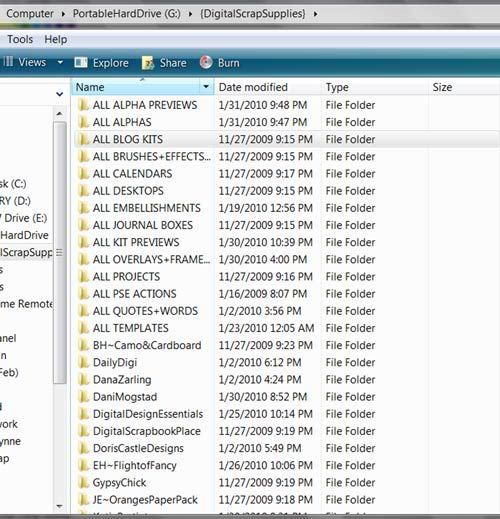
I have master folders on my portable hard drive that house each topic. I have not yet started to break down kits by type/season/theme because I like looking at all my previews as I decide which kit I want.
Here is what the beginning of what my folder list looks like:
1.jpg

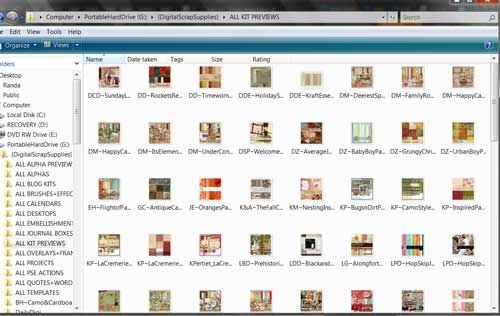
When I start to plan a page, I go to my ALL KITS file and enlarge the view or open in my photo viewer so I can peruse all the previews of my kits:
2.jpg

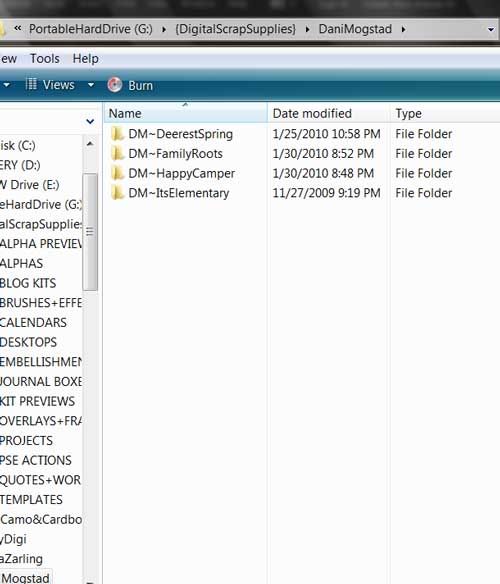
Say I decide on a Dani Mogstad kit....I can then go back to my general DigiScrap files and find the Dani Mogstad folder, open it and go to the kit:
4.jpg

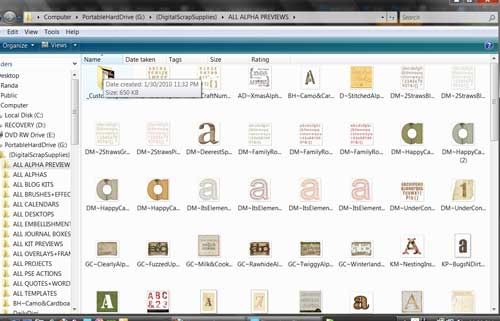
I do the same routine for alphas. Here is a peek at my alpha preview folder:
3.jpg

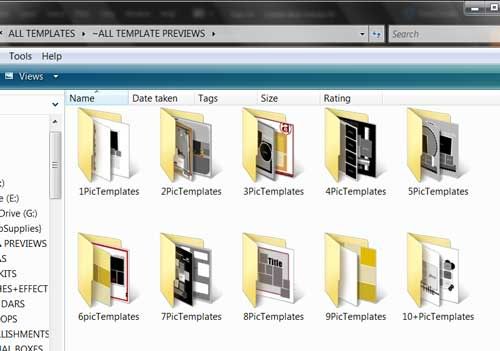
Also for my templates (this is my favorite!) Here is my template preview folder:
template-s.jpg

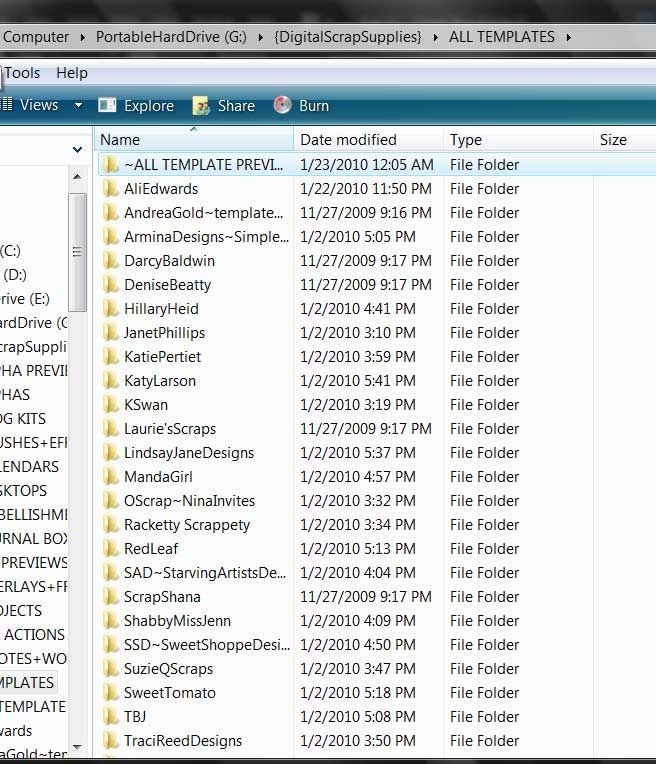
Then once I find the preview of the template I want I use the name to go back out and get it from that designer's folder:
templates.jpg


Hope that is helpful and not just a bunch of craziness to you!! I would love to have everything tagged...down to my last red button! But, I find I spend more time organizing than scrapping when I try to tag :)
 
Wait, so we are suppose to organize stuff? Isn't that like cleaning. That's one of the reason I don't really paper scrap. Too much mess. :)
I'm mostly a kit girl, so just store, then designer folders for me. Good luck tagging I tried that and gave up after two days and not making a dent.
 
I like the idea of having all the previews in one place! I can feel some organizing time needs to be found @ my house! These are great ideas :)
 
I liked the idea of having the previews in one place, thank you for the inspiration.

I like having all my kits in one big folder so that I can see the general colors, etc, but I needed a way to keep track of where things came from (especially for the monthly portfolio), so today I created an All Kits Preview folder, and seperated the previews by store.
 
I liked the idea of having the previews in one place, thank you for the inspiration.

I like having all my kits in one big folder so that I can see the general colors, etc, but I needed a way to keep track of where things came from (especially for the monthly portfolio), so today I created an All Kits Preview folder, and seperated the previews by store.

Awesome! I've thought of printing my kit previews, template previews, and alpha previews off to put in a binder but just never get around to doing it! Would be great to have it in my hot little hands when I sit down to do a page. Great idea to separate by store in the binder!
 
Back
Top