

View Full Version : Any PSP users here?
I am about to :cursing: at this computer. Mr. Dell is being good but Mr. PSPxi is really driving me nuts. I've been trying to scrap all night and the stupid thing will not open or gives me this error message:
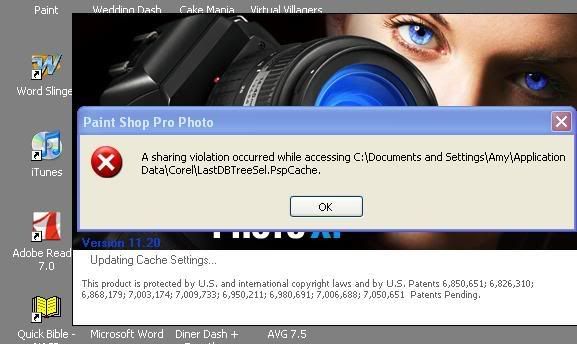
http://i4.photobucket.com/albums/y132/prodigaldaughter1978/11111PSPerrormessage.jpg
If I find a tree that grows money I will buy myself a brand spanking new top of the line laptop with CS3. Until then, I'm stuck with this. HELP! :blink:
amandabarugh
12-20-2007, 09:51 PM
I use PSP XI, but I've never had that error message come up for me. Infact, I've never had problems with it.
Although I don't blame your for wanting PS CS3. I wouldn't mind having it myself.
tracey
12-20-2007, 09:57 PM
Hmm I still use 9 sometimes, and have never seen that before. Will it let you in long enough to try and clear your PSP cache?
FlirtatiousBrat
12-20-2007, 10:24 PM
Try going into your folder and deleting the selection that's giving the error. Copy the selection to your desktop before deleting so you can reload it. It should be in your program files/corel/preset selections or something like that
ZaCola3
12-20-2007, 11:26 PM
Amy,
I use PSP, but I have never encountered this error!
Sorry I can't help you.:confused:
Stacey42
12-21-2007, 06:26 AM
I've got X adn XI but I've never seen that one either. SOrry
Micheline Martin
12-21-2007, 06:46 AM
I use psp 9 exclusivly but never saw that message before I'm really sorry. Hope it goes away fast!
Thanks ladies! I went into the Corel program files and deleted the .thmbs and a couple little other things that have to do with the cache....uh if I'm saying that right :huh: LOL It's better but still not quite right.
FlirtatiousBrat
12-21-2007, 08:14 AM
You can delete the cache folder and it will rebuild
C:\Documents and Settings\user_name\Application Data\Corel\Paint Shop Pro\10\Cache or try deleting the cache again in PSP and letting it rebuild
Choose File...Preferences...Reset Preferences.
In the Reset the Application dialog, CHECK the "Delete all cache files" checkbox.
Click the OK button.
Exit PSP. The cache files will be deleted.
Restart PSP. The cache files will be rebuilt as needed
and yah those thmbs and pspbrswe files you can delete
also on another note..I'd definately think on your next puter upgrade or whatnot that you move to PS..it makes much more sense than PSP. I was an avid PSP user for YEARS and made the change cold turkey and haven't looked back. I LOVE PS now!!
vBulletin® v3.8.7, Copyright ©2000-2012, vBulletin Solutions, Inc.