

You are using an out of date browser. It may not display this or other websites correctly.
You should upgrade or use an alternative browser.
You should upgrade or use an alternative browser.
Connect & Create: Q&A
- Thread starter Sherly
- Start date

AshleyMilfd
Active member
2 questions
1) my program doesn't have an option to draw lines pretty like the example. I have to manually do it and even with my most delicate drawing it turns into a horrible mess. I am hoping that if I upload my mess of a board but also list what prompt goes with what along with the image of the layout, it will be OK.
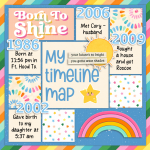
2) with the "scrap with a map" (paraphrased) I know that there is some flexibility with interpretation but not sure if my idea stays within the scope of the prompt. I did a layout with a timeline map not a traditional geographical map and want to make sure that it will be accepted before I upload my card.
1) my program doesn't have an option to draw lines pretty like the example. I have to manually do it and even with my most delicate drawing it turns into a horrible mess. I am hoping that if I upload my mess of a board but also list what prompt goes with what along with the image of the layout, it will be OK.
2) with the "scrap with a map" (paraphrased) I know that there is some flexibility with interpretation but not sure if my idea stays within the scope of the prompt. I did a layout with a timeline map not a traditional geographical map and want to make sure that it will be accepted before I upload my card.
Attachments
AshleyMilfd
Active member
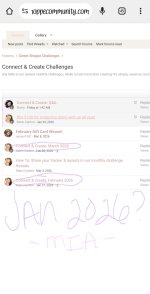
OK I have another one. Lol. In the info outlining the c&c rules and such it states that if we scrap 10 out of 12 months we will qualify for the drawing. I noticed that there was a Feb (I thought that the bday games were the only challenges last month lol) so that takes off a month but I didn't see January? Was there a Jan? Or am I missing something? Pretty much asking if I lost out on 2 months or 1 so far.
Attachments

lorigaud
Well-known member
I could be wrong, but I believe the year starts in February with the birthday celebration, so it's not a traditional calendar year. January of 2026 was included as part of last year's 12 months.OK I have another one. Lol. In the info outlining the c&c rules and such it states that if we scrap 10 out of 12 months we will qualify for the drawing. I noticed that there was a Feb (I thought that the bday games were the only challenges last month lol) so that takes off a month but I didn't see January? Was there a Jan? Or am I missing something? Pretty much asking if I lost out on 2 months or 1 so far.

Sherly
Sweet Shoppe SugarBabe Lead
Ashley,2 questions
1) my program doesn't have an option to draw lines pretty like the example. I have to manually do it and even with my most delicate drawing it turns into a horrible mess. I am hoping that if I upload my mess of a board but also list what prompt goes with what along with the image of the layout, it will be OK.
2) with the "scrap with a map" (paraphrased) I know that there is some flexibility with interpretation but not sure if my idea stays within the scope of the prompt. I did a layout with a timeline map not a traditional geographical map and want to make sure that it will be accepted before I upload my card.
1) I think we can be considerate what you are planning to upload to show your challenge participation.

2) Your idea of how you tackle that 'map' prompt is great!
3) We started the Connect & Create challenge in February, along with the 20th birthday celebration, so (@Robin Carlton, correct me please if I am wrong here), we will be counting the January 2027 challenges as the 12th month.
Sherly
Sweet Shoppe SugarBabe Lead
Thank you for helping in replying Ashley's question, Lori.I could be wrong, but I believe the year starts in February with the birthday celebration, so it's not a traditional calendar year. January of 2026 was included as part of last year's 12 months.


January 2027 will be the 12th month or we do a buy month where appropriate if the schedule changes, etc.
The mess of a tracker card is no problem at all. We'd give you credit with no cards as long as your post is updated with each layout labeled with your word combo! Dont stress, we never look to disqualify anyone
The mess of a tracker card is no problem at all. We'd give you credit with no cards as long as your post is updated with each layout labeled with your word combo! Dont stress, we never look to disqualify anyone

porkchopsmom
Well-known member
I know Robin says it doesn't matter but someone used twine last month for theirs and it was so tidy and I thought it was a genius idea.2 questions
1) my program doesn't have an option to draw lines pretty like the example. I have to manually do it and even with my most delicate drawing it turns into a horrible mess. I am hoping that if I upload my mess of a board but also list what prompt goes with what along with the image of the layout, it will be OK.
2) with the "scrap with a map" (paraphrased) I know that there is some flexibility with interpretation but not sure if my idea stays within the scope of the prompt. I did a layout with a timeline map not a traditional geographical map and want to make sure that it will be accepted before I upload my card.

Romajo
Well-known member
Just wondering what you mean with '3 different greens'...
Do you mean 3 shades of green or do you mean 3 different pieces of greenery/foliage?
I know it's open to interpretation, so probably both ways are okay, but I would love to know what your initial idea was (also compared to the 'variety of greenery' option).
Do you mean 3 shades of green or do you mean 3 different pieces of greenery/foliage?
I know it's open to interpretation, so probably both ways are okay, but I would love to know what your initial idea was (also compared to the 'variety of greenery' option).
Since it's March, I think I was thinking 3 different shades or tones of green.Just wondering what you mean with '3 different greens'...
Do you mean 3 shades of green or do you mean 3 different pieces of greenery/foliage?
I know it's open to interpretation, so probably both ways are okay, but I would love to know what your initial idea was (also compared to the 'variety of greenery' option).
Romajo
Well-known member
That's what I saw others doing, so thank you for getting me in the right direction.Since it's March, I think I was thinking 3 different shades or tones of green.
AshleyMilfd
Active member
Question for April's card "scrap a colorized B&W photo". Which one of these is the correct Direction to go?
I don't have any old B&W photos and when I use a current one it ends up looking like a regular filtered photo.. can we use something like the 2nd one, that has a pop of color ?
Here's the first one
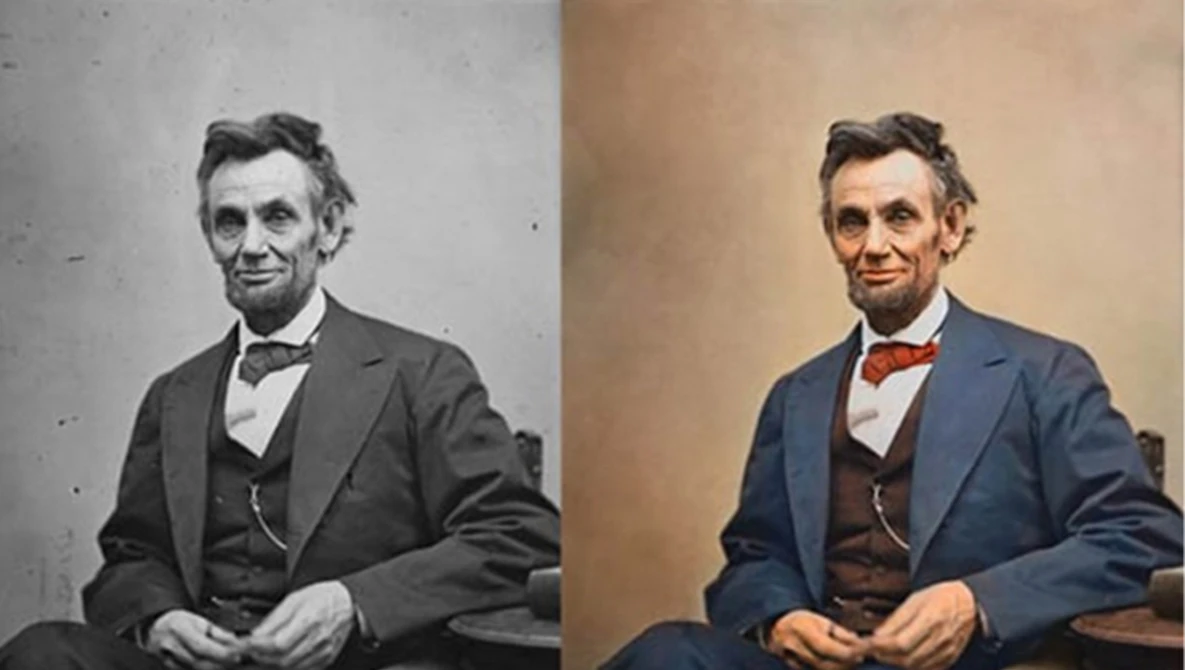
And the second: which only has one color to pop in a B&W photo

I don't have any old B&W photos and when I use a current one it ends up looking like a regular filtered photo.. can we use something like the 2nd one, that has a pop of color ?
Here's the first one
And the second: which only has one color to pop in a B&W photo

fruitysuet
Sweet Shoppe SugarBabe
Hmm, I take it to mean a photo that has been turned black and white but with parts of it left coloured. @Robin Carlton any pointers?

AshleyMilfd
Active member
That's the direction I was going but then when looking for an app to do that, my search results made me second guess it. Overthinking everything is my 2nd hobby lol.Hmm, I take it to mean a photo that has been turned black and white but with parts of it left coloured. @Robin Carlton any pointers?
View attachment 679862
Last edited:
Sherly
Sweet Shoppe SugarBabe Lead
I am not sure which it is, so let's wait for @Robin Carlton's clarification.
You guys are going to hate my answer, but I would be fine with either option, and both had occurred to me when writing the challenge. I really do try to give you concepts that are open to interpretation so you can challenge yourself in ways that are meaningful to you

Leablahblah
Well-known member
why would we hate your answer!? LOLYou guys are going to hate my answer, but I would be fine with either option, and both had occurred to me when writing the challenge. I really do try to give you concepts that are open to interpretation so you can challenge yourself in ways that are meaningful to you
I think it's free for all according to your rules. Go with your gut feeling and it will be right haha
porkchopsmom
Well-known member
No way love your answer.You guys are going to hate my answer, but I would be fine with either option, and both had occurred to me when writing the challenge. I really do try to give you concepts that are open to interpretation so you can challenge yourself in ways that are meaningful to you
AshleyMilfd
Active member
I love that answer, I was 85% sure that's what you would say. I just start over analyzing the 15% that's unsure and get hung up on it. Lol. I'm honestly super happy I get to use a photo I've had on my list to scrap. Thank you so much for the clarificationYou guys are going to hate my answer, but I would be fine with either option, and both had occurred to me when writing the challenge. I really do try to give you concepts that are open to interpretation so you can challenge yourself in ways that are meaningful to you

MargaretAnne
New member
Are we allowed to use the quarterly seasonal free samples to complete the challenges?
Sherly
Sweet Shoppe SugarBabe Lead
Yes, you are welcome to use freebies to complete challenges!Are we allowed to use the quarterly seasonal free samples to complete the challenges?

bcgal00
Well-known member
Challenge deadline - is it the end of the last day of the month? or do we have until the evening of the 1st to complete and upload? or is it only the tracker that can be updated on the 1st, not challenge entries? Just want to clarify if I need to finish up today or I still have tomorrow.
You have til tomorrow <3Challenge deadline - is it the end of the last day of the month? or do we have until the evening of the 1st to complete and upload? or is it only the tracker that can be updated on the 1st, not challenge entries? Just want to clarify if I need to finish up today or I still have tomorrow.
Also, if you want to catch up on previous month's to be eligible for playing along for our annual grand prize, you're welcome to do that. You wont get rewards, etc. but you can enter to win if you're coming in late!
AshleyMilfd
Active member
I wish I could insert a gif right now of someone dancing so happy right now. Yay, now I gotsta double time my layouts to make up for feb.You have til tomorrow <3
Also, if you want to catch up on previous month's to be eligible for playing along for our annual grand prize, you're welcome to do that. You wont get rewards, etc. but you can enter to win if you're coming in late!
I wish I could insert a gif right now of someone dancing so happy right now. Yay, now I gotsta double time my layouts to make up for feb.
I got chu!

AshleyMilfd
Active member
So, my program doesn't allow me to change the opacity of anything. Any ideas on how I can get that prompt done??
And mirroring is not an option either. I can do the exact same elements om each side but they won't be mirrored and my photo Def can't be mirrored.
And mirroring is not an option either. I can do the exact same elements om each side but they won't be mirrored and my photo Def can't be mirrored.
fruitysuet
Sweet Shoppe SugarBabe
For the opacity, can you re-colour something so it is lighter in tone? For the mirroring, can you rotate/flip? Sorry you are having these problems. If you say what program you use, someone who is familiar with it might have better suggestions.So, my program doesn't allow me to change the opacity of anything. Any ideas on how I can get that prompt done??
And mirroring is not an option either. I can do the exact same elements om each side but they won't be mirrored and my photo Def can't be mirrored.

karlimarie
Sweet Shoppe SugarBabe
So, my program doesn't allow me to change the opacity of anything. Any ideas on how I can get that prompt done??
And mirroring is not an option either. I can do the exact same elements om each side but they won't be mirrored and my photo Def can't be mirrored.
I’m not sure about work arounds in your program, but apps like Canva and PhotoGrid and even Procreate can help with the features you’re missing.
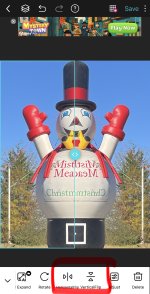
Here is an example from PhotoGrid of how to “mirror” an object…
Here it is in Canva
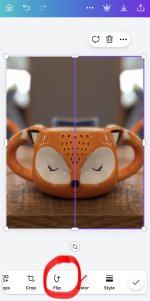
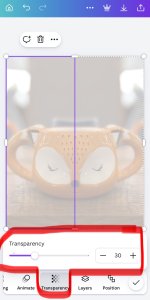
Canva also allows you to change the transparency, but it cannot images as a png on the free version, so the opacity will be turned down but you won’t be able to see an item below it outside of Canva.
AshleyMilfd
Active member
It's an app not geared towards what I do. It's pixelab and only ment to put text over photos. I've never run across anyone else that uses it. It's pretty primitive as I'm only on my phone (android) I've attempted the canva but can't get the shadows and the quality of the end result is not very good. I haven't used it in a while so I guess I can check it out and try to work around it
AshleyMilfd
Active member
I'll check that out. Thanks for that!I’m not sure about work arounds in your program, but apps like Canva and PhotoGrid and even Procreate can help with the features you’re missing.
Here is an example from PhotoGrid of how to “mirror” an object…
View attachment 683054
Here it is in Canva
View attachment 683055View attachment 683056
Canva also allows you to change the transparency, but it cannot images as a png on the free version, so the opacity will be turned down but you won’t be able to see an item below it outside of Canva.
Romajo
Well-known member
Yes, it means you have to use the same template, each in a different way. Or at least, that's how I had interpret it.Hi,
Is it normal that in the post Connect & Create: May 2026, we have the same instruction in the last two boxes of the right column? Thanks in advance.
Maybe you can use 1 of the templates for the template mash-up challenge that's been hosted for iNSD and that same template but as is.

Thuria
Active member
Ok, thanks for your reply!Yes, it means you have to use the same template, each in a different way. Or at least, that's how I had interpret it.
Maybe you can use 1 of the templates for the template mash-up challenge that's been hosted for iNSD and that same template but as is.
karlimarie
Sweet Shoppe SugarBabe
Yeap! You got it.
You pick two prompts from the left and connect them to the one template prompt on the right. You can change up how you use the template in anyway you’d like.Here’s an example from the babes:
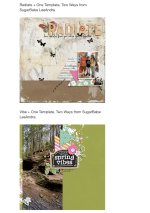
And here’s what it would look like on your card.
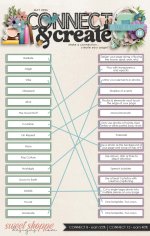
You pick two prompts from the left and connect them to the one template prompt on the right. You can change up how you use the template in anyway you’d like.Here’s an example from the babes:
And here’s what it would look like on your card.